This update brings several important fixes reported by the community:
Item saving: fixed a bug where, in certain cases, items earned in-game (drops, pets, purchased gear) could fail to save properly if a session ended unexpectedly. Your items are now saved just as often and just as reliably as your kamas.
Fights freezing on Sram traps: fixed a bug that could completely freeze a fight when a monster got stuck in a Sram trap.
Monsters stuck on the map: fixed a bug where, on some maps, a monster could spawn in an invalid position at the start of a fight, making the fight impossible to finish.
Keyring (llavero): fixed a bug where the keyring only worked correctly the first time it was used on a given dungeon — from the second use onward, it consumed the charge and reset the 24h cooldown without actually teleporting you in. It now works normally every time.
Hero Mode: you can now accept alliance invitations and duel challenges addressed directly to your hero, without needing to take control of it first — just like guild invitations already work.
Thanks to everyone who reported these issues! Your screenshots and details were key to fixing them quickly.
We've applied a round of fixes to Hero Mode based on the reports you sent us on Discord since launch. Here's a summary of what was fixed:
Chat
Fixed a bug causing duplicated messages when chatting with Hero Mode active.
Combat
Fixed a bug where the hero's spells would get locked, only allowing melee attacks.
Fixed reconnecting mid-fight: both the main character and the hero now correctly recover their proper roles (previously, who was the leader could get swapped).
Fixed a case where the hero, upon reconnecting in combat, wouldn't recover its correct position and would get stuck, preventing the fight from continuing normally.
Fixed: the hero's spell/AP/MP bar now updates correctly starting from the very first turn after reconnecting.
After combat
Fixed: the hero now properly follows the main character again once the fight ends (previously it could remain stuck on the fight's map, even while showing as connected).
Thanks to everyone who reported these issues — it was essential for identifying and fixing each one. Good fights!
Did you know you can now pay for the Character Transfer without spending a single ogrine? Here's how it works, step by step.
HOW DOES IT WORK?
Go to the Vote page (top menu) and vote on both available sites.
Each valid vote gives you 10 Stars.
Is it your first time voting on a site? You get a welcome bonus of 100 extra Stars, just for that first vote!
Collect 600 Stars and that's it: you can request the Character Transfer without spending ogrines.
HOW LONG DOES IT TAKE TO REACH 600 STARS?
Voting every day on both sites, you'll have your transfer paid off in about 3 weeks. With the welcome bonus, even faster!
WHERE DO I PAY WITH STARS?
On the Character Transfer page, when creating your request, choose the "Stars (voting)" option instead of ogrines. That simple.
BONUS: VOTE RANKING
You can now also see who votes the most for the server on our new Vote Ranking, available on the Rankings page (/ladder). Compete for first place!
Vote, help the server grow, and get your Transfer for free. It's that simple!
Tired of having to open several clients or switch windows to play with your second account? Hero Mode has arrived in Donefus! You can now control multiple characters from the SAME account at the same time, in a single window.
WHAT IS IT?
Hero Mode lets you summon other characters from your account as "heroes": they follow you around the map, join you in combat as allies, and you can take direct control of any of them with a single click, without logging out or opening another client.
HOW DO I ACTIVATE IT?
Look for the "Heroes" icon in the game interface's quick-access icon bar (next to icons like the guide and teleport). Click it to open the panel with every character on your account.
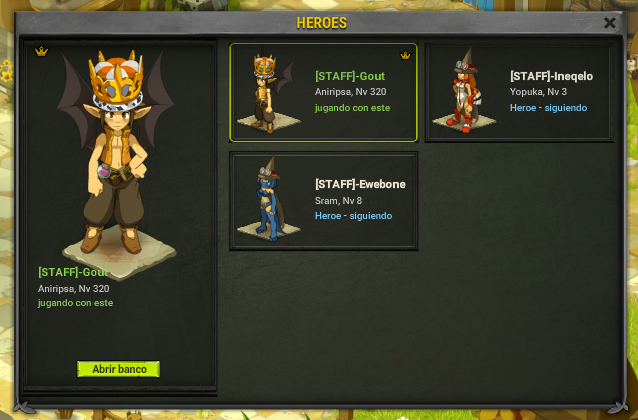
HOW MANY HEROES CAN I HAVE?
Free account: 1 hero connected at the same time.
VIP account: up to 4 heroes connected at the same time.
HOW DO I USE MY HEROES?
SUMMON: pick a character in the panel and click "Summon". It appears next to you and automatically follows you around the map.
TAKE CONTROL: click "Take control" to directly play that character (no re-login needed). Whichever one you release keeps following you as before.
DISMISS: disconnects the hero once you no longer need it.
AUTO-PASS TURN: in combat, turn this on so the hero passes its own turn automatically, without you having to play it manually.
BANK: the bank is shared between all characters on the account. The "Open bank" button works for any selected hero, even one you haven't taken control of at that moment.
COMBAT
When you enter a fight, your connected heroes join you as teammates. You can play each one's turn yourself, or let the ones with "auto-pass turn" resolve on their own.
DUNGEONS
Every dungeon requires a key or a keyring to enter (same as for any character). Your heroes do NOT get in for free: each one needs its own key or its own available keyring cooldown to come along. If a hero doesn't meet the requirement, it simply stays outside -- you and the rest of the group can still enter normally.
CAN CHARACTERS FROM OTHER ACCOUNTS BE HEROES?
No -- Hero Mode only works with characters from the SAME account. If you have characters spread across different accounts, use Character Transfer to bring them all onto one account first.
WHERE DO I FIND IT?
The "Heroes" button sits directly in the game interface's icon bar -- it's not hidden inside any submenu.
Build your team and play with all your characters at once, hassle-free!


 Server update
 Read more